Fire TV resolution guide · Updated September 30, 2026
Will a 4K Fire TV Stick make a 1080p TV 4K?
No. A streaming stick cannot change the resolution of your TV screen. A 1080p television remains 1080p, even when connected to a 4K-capable device.
Before upgrading: Check the TV resolution, the content and app you plan to watch, and your home network. 4K playback needs a compatible 4K display and 4K content. Wi-Fi 6E uses the 6 GHz band only with compatible networking equipment.
Three checks before you buy
- Screen: Look up the TV’s resolution in its settings or manual. If it is 1080p, a new streaming stick cannot turn the panel into a 4K screen.
- Content: 4K playback also depends on the title, app or service, and its requirements. Check those details for what you watch.
- Network: Wi-Fi 6E’s 6 GHz feature needs a compatible router or access point. Check your network equipment before paying extra for a feature you may not use.
What the Fire TV Stick 4K Max offers
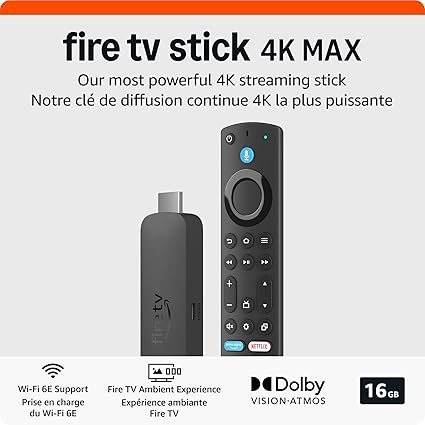
The Amazon listing identifies the 2nd-generation Fire TV Stick 4K Max as supporting 4K Ultra HD and Wi-Fi 6E, with 16 GB of storage. These are device specifications, not a promise that a 1080p TV will show 4K or that your Wi-Fi will be faster. We have not independently tested this unit.
As an Amazon Associate, I earn from qualifying purchases.
Check the current Amazon listingPrice and availability can change. Confirm compatibility and current details on the listing.
Video transcript
Will a 4K stick turn your 1080p TV into 4K? No. Your screen sets the resolution. 1080p stays 1080p. The Amazon Fire TV Stick 4K Max, second generation, supports 4K Ultra HD, Wi-Fi 6E, and has 16 gigabytes of storage. Wi-Fi 6E needs compatible home networking, and 4K benefits need a compatible 4K display. Check your TV and router before upgrading. Compare device fit at FireStickMasters.com. As an Amazon Associate, I earn from qualifying purchases.
4K streaming questions
Will a 4K Fire TV Stick make a 1080p TV display 4K?
No. The TV panel determines its display resolution. A 1080p TV does not become a 4K display when you connect a 4K streaming device.
What do I need to watch something in 4K?
You need a compatible 4K display, 4K content, and an app or service that offers that content. Check the requirements for your particular TV and service.
Does Wi-Fi 6E need a compatible router?
To use the 6 GHz band, Wi-Fi 6E needs compatible home networking equipment that supports it. Check your router specifications and settings.