Best FireStick Apps for 2026 (Canada)
Transform your Fire TV Stick into the ultimate entertainment hub with these must-have apps. From streaming to gaming, we've curated the best options available for Canadian users.
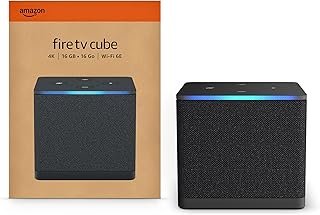
Your Amazon Fire TV Stick is only as good as the apps you install. While Prime Video comes pre-installed, there's a massive ecosystem of apps waiting to unlock your device's full potential. This guide covers the essential apps every Canadian FireStick owner should have in 2026.
🎬 Streaming Services (Movies & TV Shows)
1 Netflix
Cost: $5.99-$20.99 CAD/month
Still the streaming king with the largest library of originals. Essential for most households. Offers profiles for family members and offline downloads.
Best for: Original series, international content, documentaries
2 Disney+
Cost: $7.99-$11.99 CAD/month
Home of Marvel, Star Wars, Pixar, and all Disney classics. Includes Star content (like Hulu in US) with adult-oriented shows. Perfect for families.
Best for: Families, Marvel/Star Wars fans, classic movies
3 Crave
Cost: $9.99-$22.00 CAD/month
Canada's hub for HBO content, Showtime originals, and exclusive Canadian series. Essential for prestige TV fans.
Best for: HBO shows, Canadian content, premium dramas
4 Prime Video
Cost: Included with Prime membership ($99 CAD/year)
Pre-installed on your FireStick. Thousands of movies and shows, plus excellent originals like The Boys, Reacher, and The Rings of Power.
Best for: Prime members, original series, included content
💡 Start your Check current offer: Amazon Prime trial availability varies
🎓 Ages 18-24: Prime for Young Adults - Special pricing
🎬 Already have Prime? Start watching Prime Video
Apple TV+
Cost: $9.99 CAD/month
Smaller library but high-quality originals. Ted Lasso, Severance, and Foundation are worth the subscription.
Paramount+
Cost: $6.99-$11.99 CAD/month
Star Trek universe, Yellowstone, and live CBS content. Growing library of originals.
📺 Free Streaming Apps
CBC Gem
Cost: FREE (with ads) or $4.99 CAD/month ad-free
Canada's public broadcaster offers news, original series, documentaries, and live TV. Excellent Canadian content completely free.
Why it's great: Schitt's Creek, Kim's Convenience, live news
Amazon Freevee
Cost: 100% FREE
Formerly IMDb TV. Thousands of free movies and shows with minimal ads. Surprisingly good selection including originals.
Tubi
Cost: 100% FREE
Massive library of free content. Great for classic movies, cult favorites, and hidden gems. Ad-supported but totally legal.
Pluto TV
Cost: 100% FREE
250+ live TV channels covering news, sports, movies, and more. Like cable TV but free. Perfect for background viewing.
YouTube
Cost: FREE (or $11.99 CAD/month for Premium)
Essential app. Billions of videos, live streams, music, tutorials, and more. YouTube Premium removes ads and adds background play.
⚽ Sports Apps for Canadians
TSN
Cost: $19.99 CAD/month or $199.99 CAD/year
Canada's sports network. NHL, CFL, soccer, tennis, and more. Essential for Canadian sports fans.
Sportsnet
Cost: $27.99 CAD/month (Sportsnet+)
Toronto Maple Leafs, Blue Jays, and other Canadian teams. NHL, MLB, and WWE content.
DAZN
Cost: $24.99 CAD/month
NFL Game Pass, boxing, MMA, soccer leagues. Great for international sports.
CBC Sports
Cost: FREE
Olympics, Hockey Night in Canada, Canadian championships. Free live sports coverage.
🎵 Music & Audio Apps
Spotify
Cost: FREE (with ads) or $10.99 CAD/month
90 million songs, podcasts, and playlists. Works great on FireStick for music playback through your TV.
Amazon Music
Cost: FREE with Prime or $10.99 CAD/month Unlimited
Integrated with Alexa. "Alexa, play relaxing music" works seamlessly. Unlimited has 100M+ songs.
Apple Music
Cost: $10.99 CAD/month
100M+ songs, lossless audio, spatial audio. Great if you're in the Apple ecosystem.
📰 News & Information
CBC News
Cost: FREE
Live 24/7 Canadian news. Essential for staying informed about national and local events.
CTV News
Cost: FREE
Another great Canadian news source with live streaming and on-demand content.
Global News
Cost: FREE
Live national and local news from Canada's Global TV network.
🎮 Gaming Apps
Amazon Luna
Cost: From $7.99 CAD/month
Cloud gaming service. Play AAA games on your FireStick without a console. Requires compatible controller.
Crossy Road
Cost: FREE
Fun arcade game perfect for FireStick. Simple controls with the remote.
Asphalt 8
Cost: FREE
High-quality racing game optimized for Fire TV. Great graphics on 4K FireSticks.
🎓 Educational & Kids Apps
Amazon Kids+
Cost: $2.99 CAD/month for Prime members
Thousands of kid-friendly videos, books, and apps. Parental controls included. Safe content for ages 3-12.
PBS Kids Video
Cost: FREE
Educational shows for children. Daniel Tiger, Wild Kratts, and more. Ad-free and trusted content.
Khan Academy
Cost: FREE
Educational videos on every subject. Great for students and lifelong learners.
📚 Kindle Unlimited
Cost: $11.99 CAD/month
Read ebooks and magazines on Fire Tablet while watching TV. Over 1 million titles included.
🏠 Lifestyle & Utility Apps
Plex
Cost: FREE (Plex Pass $4.99 CAD/month optional)
Stream your personal media library from your computer/NAS to your TV. Also offers free live TV and movies.
Firefox Browser
Cost: FREE
Full web browser for FireStick. Browse websites on your TV. Useful for checking email or web content.
Weather Network
Cost: FREE
Canadian weather forecasts on your TV. Radar, alerts, and extended forecasts.
📻 Canadian-Specific Apps
- ICI TOU.TV – Radio-Canada's French-language streaming (FREE)
- Noovo – Quebec's Noovo network content (FREE)
- APTN – Indigenous content from Aboriginal Peoples Television Network (FREE)
- CraveTV – Already mentioned but critical for Canadians
How to Install Apps on FireStick
- From Home screen, select the Search icon (magnifying glass)
- Type the app name or use Alexa voice search
- Select the app from search results
- Click "Get" or "Download"
- Wait for installation to complete
- Click "Open" or find it in "Your Apps & Channels"
Tips for Managing Your Apps
- Organize by category: Move frequently-used apps to the front row
- Delete unused apps: Free up storage space (Settings → Applications)
- Update regularly: Keep apps current for best performance
- Use profiles: Set up separate profiles for family members on supported apps
- Clear cache: Monthly maintenance improves performance
Our Recommended Starter Pack
If you're new to FireStick, start with these essential free apps:
- YouTube
- CBC Gem
- Amazon Freevee
- Pluto TV
- Tubi
- CBC News
Then add one or two paid subscriptions based on your interests (Netflix, Disney+, etc.).
Maximize Your Experience
To get the most from these apps, make sure you have:
- Fast internet: At least 25 Mbps for 4K streaming
- The right FireStick: 4K Max or 4K Select for best performance
- Updated software: Check Settings → My Fire TV → About → Check for Updates
- Good Wi-Fi signal: Use HDMI extender if needed
Apps to Avoid
Be cautious of:
- Apps promising "free cable TV" – often illegal or scams
- Apps requiring sideloading – stick to Amazon Appstore for safety
- Apps with poor reviews or unknown developers
- VPN apps that slow down streaming significantly
2026 App Trends
Watch for these emerging trends:
- Free ad-supported streaming (FAST): More services like Freevee and Pluto TV launching
- Cloud gaming: Luna and other services expanding to Canada
- Live shopping: QVC and similar shopping channels on FireStick
- Fitness apps: Peloton, FitOn, and others gaining popularity
Final Thoughts
Your FireStick is capable of so much more than just streaming Netflix. With the right mix of free and paid apps, you can create a personalized entertainment center that rivals traditional cable at a fraction of the cost.
Start with the free apps to explore what's available, then gradually add subscriptions based on what you actually watch. Remember, you can always cancel and resubscribe to services seasonally to save money.
Happy streaming! 📺🍿
FireStick Masters Team
Your trusted source for FireStick tips, reviews, and guides in Canada.